Business Student at The University of Victoria | Competitive Freeride Skier and Enduro Mountain Biker

Category: Weekly Reflections

My Weekly Reflections from EDCI 136

Weekly Reflection Post #6

Reflection 6: Exploring AI 

As I continue my digital literacy journey, one topic that has caught my interest is artificial intelligence (AI). This week, I wanted to dive deeper into the subject, particularly its implications for education and the broader societal landscape. To do so, I explored an insightful article titled Speculative Futures on ChatGPT and Generative Artificial Intelligence (AI): A Collective Reflection from the Educational Landscape


Summary of the Article

The article explores the evolving role of generative AI, particularly ChatGPT, in education. It explores both the promises and downfalls of AI technology through possible future scenarios, giving an interesting view of how AI could influence learning, teaching roles, and the overall education system. The authors emphasize the importance of a critical approach to AI adoption, weighing its benefits against ethical concerns, privacy issues, and the need for digital literacy.


Key Takeaways

  • AI has the potential to revolutionize education by offering personalized learning experiences, automating administrative tasks, and breaking language barriers.
  • The integration of AI should be approached with caution to avoid ethical downfalls, data privacy concerns, and over-reliance on technology.
  • Educators should maintain a leading role in learning environments while leveraging AI as a supportive tool rather than a replacement.
  • There is a growing need to develop AI literacy among students and educators to ensure informed and responsible use.
  • Speculative future narratives provide a creative and effective way to assess the potential outcomes of AI integration in education.

Next Steps

After reading this article, I feel more motivated to incorporate AI into my learning process in a mindful way. My next steps include:

  • Trying not to overuse AI and making sure I only use it to support my learning rather than doing my work for me.
  • Keeping up with new AI developments and conversations in education to see how its role is changing.
  • Trying AI as a one-on-one tutor to see if it benefits my learning.

Learning more about AI has strengthened my belief that while it has great potential, its impact depends on how we use and control it. I’m excited to keep exploring digital literacy and AI’s role in education.
Weekly Reflection Post #5

Reflection 5: Curation

This week, the guest lectures covered two different topics. In the first lecture, we learned about annotation, and in the second, we learned about a very useful learning tool called Zotero.


Dr. Remi Kalir’s Lecture

I found this lecture really interesting, and learning about annotation was especially cool. I had never considered annotation as a learning tool before, but it turned out to be one of the most interesting concepts I explored this week. As mentioned in the lecture, I now understand how powerful annotation can be if incorporated more widely in education. I believe it should be integrated into every assignment, particularly when teachers provide feedback. Instead of writing comments on a separate document, it would be much clearer if they annotated directly on the student’s work.

Key Takeaways from This Lecture:

  1. Learning what annotation is and how much it is used around the world.
  2. Understanding that annotation is an everyday literacy practice.
  3. Recognizing that annotation can be a very useful tool in learning and can make communication with classmates and teachers more meaningful.

Jessica Mussell’s Lecture

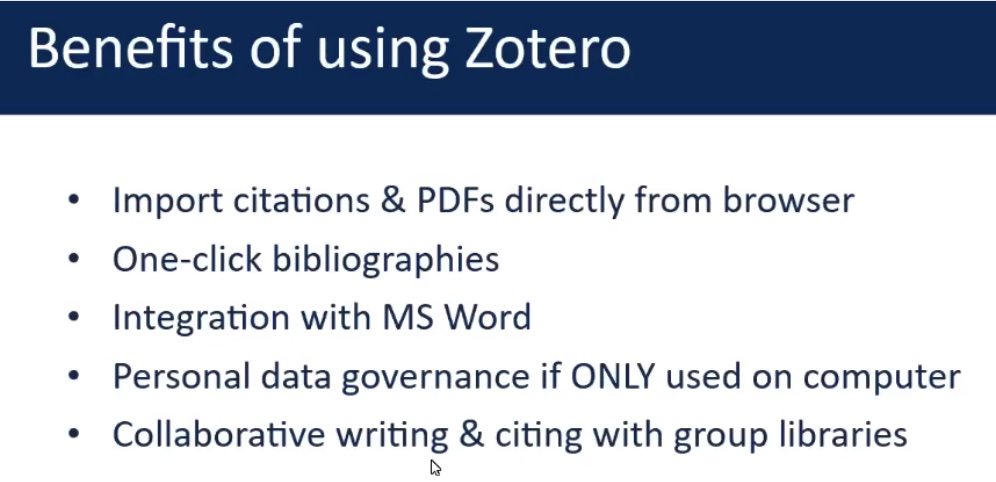
In the next guest lecture, Jessica taught us about a learning tool called Zotero. Zotero seems really beneficial and appears to be a huge time saver. All the benefits of Zotero seem game-changing, especially having the ability to integrate it into MS Word.

Photo from Jessica Mussell’s Lecture

Getting a step-by-step walkthrough of Zotero was very useful and made it seem much more manageable. At first glance, it does look a little overwhelming, but after Jessica gave us the walkthrough, it made way more sense.

Before learning about Zotero, I had always used a website called MyBib. After learning more about Zotero, it seems much better and more efficient. The tool on Zotero that updates your reference list if you delete a quote in your writing really stood out to me. In the future, I will be moving to Zotero for my writing. I have downloaded Zotero and am very excited to start learning to use it, as I feel it will be a very useful tool for my learning.


Final Thoughts

I really enjoyed these two guest lectures this week and found them very interesting. I have downloaded Hypothes.is and Zotero, and I am excited to use both of these tools to benefit my learning in the future!

Weekly Reflection Post #4

Reflection 4: Exploring AI’s Environmental Impact

For this week’s blog post, I chose to dive into an article that caught my interest: AI has an environmental problem. Here’s what the world can do about that (United Nations Environment Programme, 2024). The intersection of artificial intelligence (AI) and environmental sustainability is a topic I find both compelling and crucial in today’s rapidly evolving technological landscape. I also didn’t realize that AI had an environmental impact before last week’s lectures.Ā 


Summary of the Article

The article discusses the two-sided nature of AI concerning environmental sustainability. On one hand, AI offers promising solutions for environmental monitoring, such as mapping destructive sand dredging and tracking methane emissions. On the other hand, the rapid expansion of AI infrastructure has raised concerns about its environmental footprint. Data centers housing AI servers consume significant amounts of electricity and water, produce electronic waste, and rely on the extraction of critical minerals, often through unsustainable mining practices. The United Nations Environment Programme (UNEP) emphasizes the need for a comprehensive assessment of AI’s environmental impact to ensure its net effect is positive before large-scale deployment.


What Caught My Attention

What stood out to me was the immense scale of resources consumed by AI infrastructure. The article highlights that data centers not only demand vast amounts of electricity but also consume large quantities of water for cooling purposes. Additionally, the reliance on rare minerals, often mined unsustainably, adds another layer of environmental concern. This contrast of AI’s potential benefits with its substantial resource demands was both eye-opening and thought-provoking.


Major Takeaways

  1. Resource Consumption: The environmental cost of AI is substantial, with data centers consuming significant electricity and water, and contributing to electronic waste.
  2. Sustainable Practices: There’s an urgent need to implement sustainable practices in AI development and implementation to mitigate its environmental impact.
  3. Policy and Regulation: Governments and organizations must collaborate to establish policies that balance AI innovation with environmental preservation.

Next Steps in Learning About AI

To deepen my understanding of AI’s environmental implications, I plan to:

  • Research Sustainable AI Initiatives: Explore current efforts and technologies aimed at reducing the environmental footprint of AI.
  • Stay Informed: Regularly follow reputable sources and publications that report on advancements and challenges in sustainable AI practices.

After reading this article, I have learned a lot about the waste AI generates and am hopeful that environmentally friendly alternatives will become available in the near future.

Weekly Reflection Post #3

Reflection 3: Artificial Intelligence, Academic Integrity, and More

This week in EDCI 136, our learning focused on Generative AI, academic integrity, and the ethical considerations surrounding AI usage in education. We explored how AI tools are evolving, their implications for students and educators, and strategies for effectively integrating them into learning.


Lucas Wright’s Lecture:

Lucas Wright’s Lecture titled, Generative AI: A Sea of Change was very interesting and it was cool to learn so much about AI. 

The first thing that caught my attention in this lecture was a statistic Lucas shared: ā€œ59 per cent of 423 Canadian students surveyed use generative AI in their schoolwork, compared to 52 per cent in 2023.ā€ This surprised me, as I thought the number would be higher. However, he mentioned that he expects the real number to be much higher now.

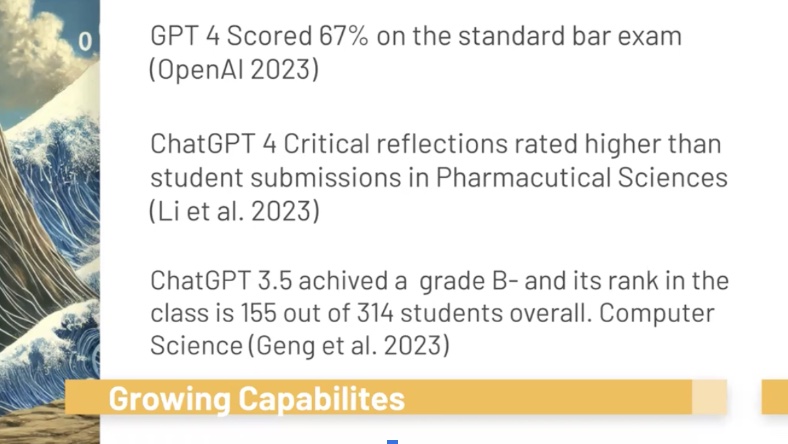
Another key takeaway was seeing how generative AI scores on school exams and how much it has improved over time.

Photo from Lukas Wright’s Lecture

This makes me curious to see how much AI will improve a year from now, given how fast it is evolving.

One of the most interesting concepts was that AI is 100% confident in its outputs but only about 70-80% accurate. This resonated with me because I learned the same thing in my COM 200 course last semester. Another surprising fact was that AI checkers are not very accurate, with only about a 34% effectiveness rate—and that number is declining.


Discussion with Valerie Irvine and Lucas Wright

In the lecture where Valerie and Lucas discussed Lukas’s lecture and talked more about AI one of the coolest things I learned was that you can create different GPTs tailored to specific needs. Before this lecture, I had never used custom GPTs, but after learning about them, I started creating my own. So far, I have built:

  • A grammar checker that reviews my work without changing my words, focusing solely on grammar.
  • An email responder similar to the one Lucas shared. It breaks down the email, explains what the sender is asking, prompts me for a response, and then generates a professional and concise reply.

This was one of my favorite discoveries of the week!


Miriel Miller’s Lecture

Miriel Miller’s Lecture was very interesting and I learned a lot about using AI in education. The first statement that stood out to me was: ā€œIf you go to AI first, you are using it too much. You are taking courses to learn.ā€ This really stuck with me and reminded me to ensure that I’m using AI as a tool rather than letting it do the thinking for me.

Another key insight was the idea that setting goals for how I use generative AI can help me ensure that I am leveraging it in a way that aligns with my learning objectives. This is something I want to implement in my own academic work.


Final Thoughts:

This week’s content has been my favorite so far! Learning about AI in depth has been really interesting, and I gained so many new insights. My favorite tool was discovering the different GPTs I could create, which I first learned about in Lucas’s lecture. The most surprising thing I learned was about the environmental impact of AI. I had never considered the resources AI consumes, and this is something I will definitely think about more when using it in the future.

Weekly Reflection Post #2

Reflection 2: Open Licensing, Copyright, and Digital Creation in Week 5

This week in EDCI 136, our learning focused on open licensing, copyright, and the importance of making knowledge accessible. Before this week, I had never really thought too much about any of these topics, but after watching the lectures with Cable Green and Inba Kehoe, I now have a better understanding of their significance and am very interested in learning more about them.


Cable Green’s Lecture:

Cable Green’s lecture on Open Licensing and Open Educational Resources was one of the most interesting things I have learned in this course so far. One of the key takeaways for me was the idea that all knowledge about a problem needs to be open in order to solve it and to ensure everyone is aware of its significance. He gave the example of climate change and COVID-19, where having access to scientific data and research is crucial for people to learn and make informed decisions. This really made me question how much valuable information is locked behind paywalls today and how that could slow down progress in solving major global issues.

Another concept that stood out to me from his lecture was Creative Commons licensing. I enjoyed learning that you can give your own photos the rights to be used on different platforms, such as calendars. The idea of open licensing gives people the ability to retain, reuse, revise, remix, and redistribute (the 5Rs), which makes knowledge more accessible and adaptable for different purposes. This made me realize that throughout all of elementary and high school, whenever I made a PowerPoint presentation for school, I had never thought about whether I had permission to use the photos I was using or if I was just fully stealing their work without permission. I was also surprised that our teachers had never mentioned this to us before.


Inba Kehoe’s Lecture:

The second lecture this week was with Inba Kehoe from UVic Libraries, who spoke about Copyright, Fair Dealing, and Licenses. I found this really useful, especially since I create content for my social media. One key thing I learned was that anything you create is automatically copyrighted to you, but if you want to go further, you can add a copyright symbol, a date, and even a title. It was also interesting to hear about how Canadian copyright law allows creators to sell their copyrights but not their moral rights, meaning that even if you sell your work, you are still recognized as the original creator.

One of the most surprising things I learned was that UVic can track who downloads copyrighted content through IP addresses. I knew that universities could monitor this kind of activity, and it made me more aware of the risks of using copyrighted material without permission. Another big takeaway for me was the importance of giving credit when using someone else’s work. If I want credit for my own work, then it’s only fair that I also properly cite the work of others.


Assignment 1: Deeper Dive Inquiry:

Last week, I submitted my plan for the Deeper Dive Inquiry assignment. I met with my pod, and we chose to learn more about video editing. Since we all have different interests, we will be making our own videos, but we will support each other’s learning and provide feedback. My personal focus will be on learning how to use DaVinci Resolve for color grading and technical editing skills. To show my learning, I plan to create a short, two-minute video from a ski trip I went on with my friends earlier this year. This will be a great way to practice editing while working on something I am passionate about.


Final Thoughts:

This week’s learning on open licensing, copyright, and fair dealing has given me a lot to think about when it comes to sharing and accessing information online. I now have a better understanding of how copyright works and why it’s important to respect creators’ rights. At the same time, learning about OER and Creative Commons made me realize how beneficial it can be to make knowledge more open and accessible. Although I feel like I have learned a lot, I know I have barely scratched the surface of what I can learn about these topics, so I am excited to continue exploring them in the future. As I start working on my video project, I will keep these concepts in mind, making sure to credit sources properly and explore the potential of open licensing in my own digital creations.

Weekly Reflection Post #1

Reflection 1: Exploring Digital Literacy Frameworks in Week 4

Until this week, I had never really had taken the time to think about what digital literacy is or what digital literacy skills I have. I use digital tools every day for school, work, and personal projects, but I’ve never stopped to truly reflect on what digital literacy means, what I actually know, and where I need to improve.
After watching Valerie Irvine’s lecture on Digital Literacy Frameworks and reading through the K-12 Digital Literacy Framework, I realized that a lot of what I know about digital literacy came from what I learned in high school. However, a lot of my digital literacy skills also come from life experiences outside of school—such as growing up as an athlete and learning how to create content for Instagram to grow my personal brand and collaborate with companies.
I also feel like the landscape of digital tools and expectations has changed so much since I was in high school just a few years ago. Digital literacy is constantly evolving, as new digital tools emerge every year. Valerie even mentioned in her lecture how much has changed recently with AI, which really made me understand that while I feel pretty digitally literate now, there will always be new things to learn and adapt to as technology continues to evolve.
As I went through the K-12 Digital Literacy Framework, it was interesting to reflect on where I feel confident and where I need to improve in my digital literacy skills.


What I Need to Improve:

Looking at the K-12 Digital Literacy Framework, I recognized a few areas where I don’t have much experience or knowledge:

  1. Programming and Coding
    One of the things under Critical Thinking, Problem-Solving, and Decision-Making was that a digitally literate person should be able to ā€œprogram ranging from using block-building code tools to a high-level programming languageā€ (BC’s Digital Literacy Framework, 2013).
    This is an area where I have zero experience. Growing up in Whistler, we only had one computer programming class available in Grade 12, and I never took it because it didn’t interest me. When I started university, I continued to avoid taking any computer programming classes because I had no idea how to do it and assumed I would suck at it—even though it was a highly recommended elective in my first year of business.
    Through learning about digital literacy this week, I’ve started to realize that I should stop ignoring computer programming, as it could be a very useful skill in my future.
  1. General Knowledge and Functional Skills in Technology Operations
    Another area that stood out to me as something I am not very confident in was under Technology Operations and Concepts, where the framework discusses that a digitally literate person should ā€œunderstand the different parts and components of a computer and/or other digital devices and can solve problems by decomposing them into smaller partsā€ (BC’s Digital Literacy Framework, 2013).
    While I am comfortable with technology and am confident in using it as I use it every day, I have never learned about the different parts of a computer and how to successfully take them apart. If something ever breaks with my technology, I normally try looking it up on Google or going to a professional for help.

Biggest Takeaway: Digital Footprint and Reputation

One of the biggest takeaways I got from this week’s material was the importance of digital footprints and specifically Valerie’s point about how digital footprint expectations vary depending on your career path and how far along you are in your career.
This is something I hadn’t really considered before. I have a good understanding of why a positive digital footprint matters, but I found it really interesting that the “rules” for what’s acceptable online are different depending on who you are and what industry you are in.
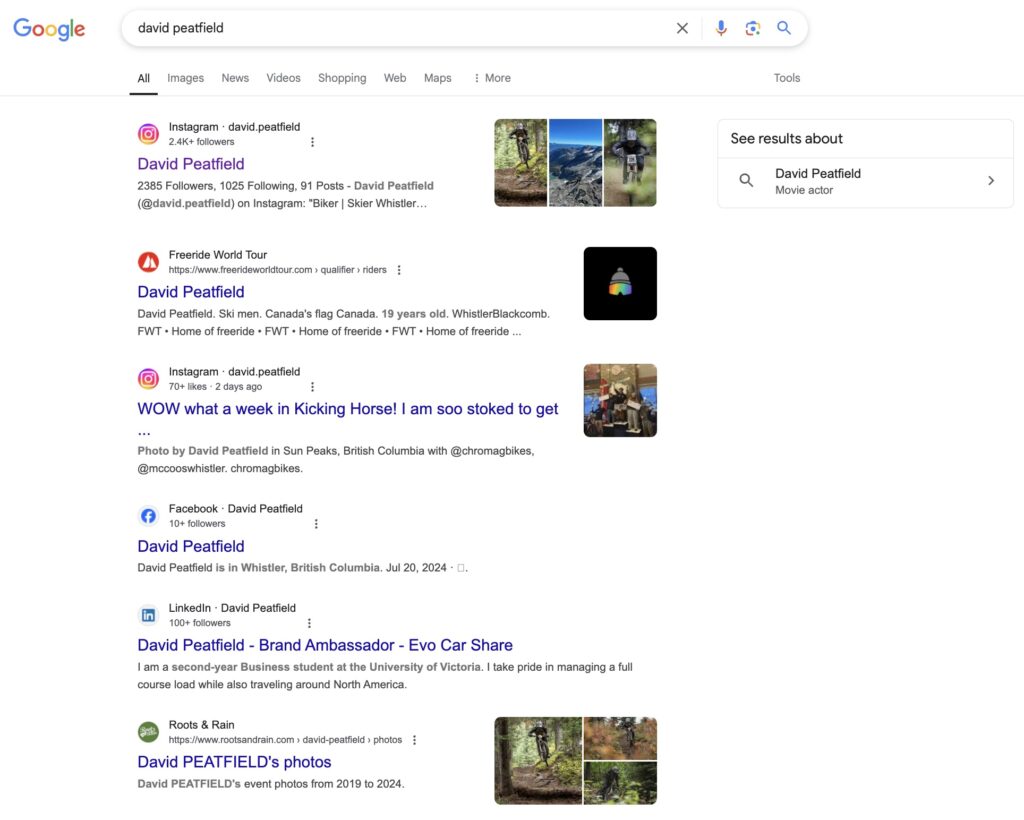
After learning this, it made me wonder what my digital footprint was like, so I searched up my name on Google, which is something I have not done in a long time. What came up did not surprise me at all, and it was pretty much exactly what I expected. My Instagram showed up, along with various other websites related to my skiing and biking. Many of these websites track results and keep points for skiing.
Learning more about digital footprints and taking the time to search myself up was one of my favorite things from this week’s learning, and I am happy to see that I believe I have a positive digital footprint for what my interests are and the possible careers I could go into in the future.


Final Thoughts

This week’s learning of digital literacy frameworks has given me a better understanding of what I know and where I need to improve. While I feel confident in many areas, I now recognize areas that I need to improve, particularly in programming and technical skills. At the same time, learning more about digital footprints made me reflect on how my online presence aligns with my future career aspirations. As technology continues to evolve, so will the expectations for digital literacy, which has made me realize that it is important that I keep learning and adapting to ever-changing technology so I do not fall behind. Moving forward, I will do my best to not avoid aspects of digital literacy that I am not confident in and do my best to always be learning more and improving.


References

BC’s digital literacy framework. (2013). https://www2.gov.bc.ca/assets/gov/education/kindergarten-to-grade-12/teach/teaching-tools/digital-literacy-framework.pdf